Train a Convolutional Neural Network in Your Browser
Introduction to Convolutional Neural Networks
Convolutional Neural Networks (CNNs) are a specialized type of deep learning model best suited for processing data with a grid-like topology, such as images. CNNs use layers with learnable filters (kernels) that scan across the input, automatically learning features like edges, textures, and shapes. The main building blocks of CNNs include convolutional layers, activation functions (e.g., ReLU), pooling layers, and fully connected layers. CNNs have achieved state-of-the-art performance in computer vision tasks such as image classification, object detection, and segmentation.
How to Train a CNN
- Prepare a labeled dataset of images (e.g., handwritten digits, cats vs. dogs).
- Define the architecture: stack convolutional & pooling layers, flatten the output, and add dense layers.
- Choose a loss function (e.g., categorical crossentropy) and an optimizer (e.g., Adam).
- Feed batches of input data through the network, compute the loss, and update weights using backpropagation.
- Evaluate the model's performance on validation data, then adjust hyperparameters and retrain as needed.
TensorFlow.js for CNNs
TensorFlow.js is an open-source library that brings machine learning capabilities to JavaScript. Using TensorFlow.js, you can build, train, and run neural networks directly in the browser or in Node.js without any server-side code. For training CNNs in the browser, TensorFlow.js provides:
- High-level APIs such as
tf.sequential()andtf.model()for easy model construction - Layers like
tf.layers.conv2d(),tf.layers.maxPooling2d(), andtf.layers.dense() - Built-in optimizers (Adam, SGD, etc.) and loss functions
- Support for GPU acceleration via WebGL for faster training
Example: Build and Train a Simple CNN (MNIST digits)
Note: This example creates a simple CNN for digit classification. For demonstration, synthetic random data is used; in practice, replace this with real image data.
// Define the CNN model
const model = tf.sequential();
model.add(tf.layers.conv2d({
  inputShape: [28, 28, 1],
  filters: 16,
  kernelSize: 3,
  activation: 'relu'
}));
model.add(tf.layers.maxPooling2d({ poolSize: 2 }));
model.add(tf.layers.flatten());
model.add(tf.layers.dense({ units: 10, activation: 'softmax' }));

model.compile({
  optimizer: 'adam',
  loss: 'categoricalCrossentropy',
  metrics: ['accuracy']
});

// Generate random training data (replace with real images)
const xs = tf.randomNormal([100, 28, 28, 1]);
const ys = tf.oneHot(tf.randomUniform([100], 0, 10, 'int32'), 10);

// Train the model
await model.fit(xs, ys, {
  epochs: 5,
  callbacks: { onEpochEnd: (epoch, logs) => console.log(logs) }
});
Try It Yourself
How to Train a CNN
- Prepare a labeled dataset of images (e.g., handwritten digits, cats vs. dogs).
- Define the architecture: stack convolutional & pooling layers, flatten the output, and add dense layers.
- Choose a loss function (e.g., categorical crossentropy) and an optimizer (e.g., Adam).
- Feed batches of input data through the network, compute the loss, and update weights using backpropagation.
- Evaluate the model's performance on validation data, then adjust hyperparameters and retrain as needed.
Visualizing a Simple CNN
The image below shows a very simplified structure of a CNN. Each circle represents a "neuron" (unit) in each layer. The input image is processed through convolutional and pooling layers to extract features, then passed to dense (fully connected) layers for classification.
Easy-to-Understand Example: Cat vs. Dog Image Classifier
Imagine you want to teach a computer to tell apart pictures of cats and dogs. A CNN model is like a set of smart filters that automatically learn the features that make cats and dogs different—like detecting ears, fur patterns, and shapes. At first, the network knows nothing. You show it thousands of labeled pictures, and after training, it learns which visual patterns most often appear with “cat” and which with “dog.” When you give it a new photo, it can predict whether it's more likely a cat or a dog—just like a simple visual detective!
Libraries for Model Definition, Training, and Visualization
To build, train, and visualize deep learning models in the browser, you’ll need a few important JavaScript libraries:
-
TensorFlow.js (model definition & training): Enables the creation and training of neural network models using JavaScript.
https://cdn.jsdelivr.net/npm/@tensorflow/tfjs@1.7.4/dist/tf.min.js -
TensorFlow.js Vis (visualization): Useful for visualizing data, model training progress, and other metrics right in the browser.
https://cdn.jsdelivr.net/npm/@tensorflow/tfjs-vis@1.0.1/dist/tfjs-vis.umd.min.js
These libraries are essential for building interactive machine learning demos and tools in JavaScript.
Discussion: The MNIST Image Dataset and Labels
The MNIST dataset is a large collection of 28x28 pixel grayscale images of handwritten digits (0 through 9). It is commonly used for training and evaluating image classification systems. Each image represents a single digit and is paired with a corresponding label indicating which digit is shown.
- Images: mnist_images.png contains all the digit images, stored as a single large PNG file.
- Labels: mnist_labels_uint8 is a binary file containing the labels (0-9) for each image in the dataset.
Each image in mnist_images.png is placed sequentially in rows, and each is paired with its label from mnist_labels_uint8. The dataset is often used to teach and test Convolutional Neural Networks (CNNs) and other machine learning models in recognizing handwritten digits.
Visualization of the Cleaned MNIST Dataset
After loading the MNIST data, it's helpful to visualize some samples to better understand the dataset. Below, you can display a selection of handwritten digit images from cleanedData along with their labels.
Splitting the Dataset: Training and Testing Sets
When building machine learning models, it's essential to separate your data into training and testing sets. The training set is used to teach the model, while the testing set evaluates how well the model can generalize to unseen data. A common practice is to use 80% of the data for training and 20% for testing.
Building a Convolutional Neural Network (CNN) Model
Convolutional Neural Networks (CNNs) are a type of deep learning model especially effective for image recognition tasks like classifying handwritten digits. In this section, you can define a simple CNN model, review its architecture, and learn how it processes images.
What is a CNN Model?
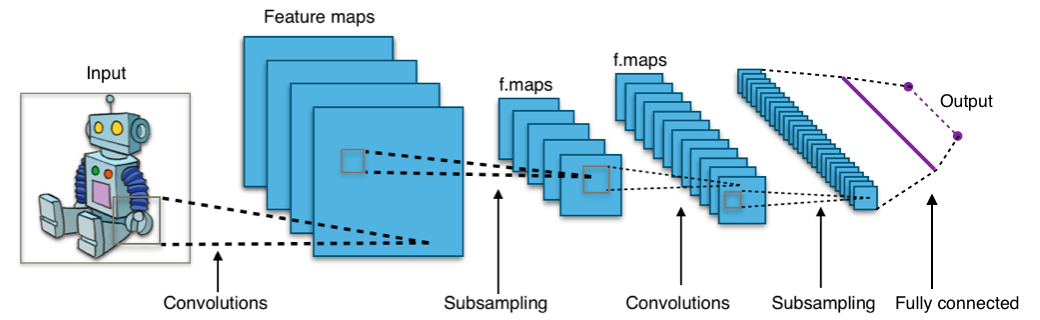
CNNs are inspired by how the human brain processes visual information. They use layers that automatically learn to detect features in images, such as edges, shapes, or even complex objects. Here’s how a typical CNN processes an image:
- Convolutional layers apply filters to the input image to extract features (like edges or textures).
- Pooling layers reduce the size of the data, keeping only the most important information.
- Flatten and Dense layers convert the feature maps into a flat vector and classify the image into categories (digits 0–9).
(Source: Wikimedia Commons)
Training the CNN Model
Once your model and dataset are ready, training is the process where the model learns patterns from the training data. The model adjusts its internal parameters to minimize the difference between its predictions and the actual labels. This process repeats over several epochs (full passes through the training data).
How Training Works
During training, the CNN model receives batches of images and their correct labels. It predicts the classes for the images, calculates how far its predictions are from the correct ones (loss), and uses an optimizer to adjust its internal weights. This process is repeated over several epochs, continually improving the model's accuracy.

Illustration: The CNN is shown learning from labeled images, adjusting filters and connections to improve performance every epoch.
(Source: Medium, for educational use)
Testing the CNN Model
After training, it's important to check how well the CNN model performs on data it hasn't seen before. This is done with the test set, which helps you understand the model’s generalization power and ensure it hasn't just memorized the training data.
How to Read the Confusion Matrix
- The rows show the true classes (actual labels).
- The columns show the predicted classes (model’s outputs).
- The number in cell (i, j) tells how many samples of class i were predicted as class j.
- Large numbers on the diagonal mean the model is correctly classifying those classes.